
Quick comparison
The figures below use each vendor's official pages: the other eight checked on 2026-11-16, Photomyne on 2026-11-17. “Not stated” means we could not find it on the official source reviewed.
| Tool | Public price basis | Free try | Face check described | Retention statement |
|---|---|---|---|---|
| Revivo Photo | $299.00 / 500 credits monthly; Restore is 2 credits | 1 free photo/day without an account | Compares result faces with the original | 30 days |
| Remini | Web price not stated; US App Store lists monthly and weekly in-app plans | Free App Store download; specific free web allowance not stated | No public face check found | Policy lists 1, 14 and 15 days in different clauses |
| MyHeritage | Photo tool prices not stated | Annual Reimagine plan includes a 7-day trial | No public face check found; Enhancer describes a simulation | Photo tool period not stated |
| Palette.fm | Homepage summary (unverified): $72 for 480 annual credits | 500×500 previews and one full-size trial credit | No public face check found | Files deleted “shortly after”; no duration stated |
| Let's Enhance | Max annual plan: $34/month for 500 credits/month | 10 credits at sign-up | No public face check found | Account period plus a 12-month maximum after closure |
| Topaz Photo | $199/year; no per-image quota found | Free try not stated | Recover Faces describes face reconstruction, not an identity check | Policy summary says cloud retention depends on plan; exact period not verified |
| VanceAI | Studio annual plan: $900 for 2,600 credits/month | 10 free credits; account requirement not stated | No public face check found | Uploads deleted within 24 hours |
| PicWish | Prices not stated | Limited free use and a 72-hour trial | No public face check found | Processed uploads said to be permanently deleted; duration not stated |
| Photomyne | Subscription; AI restore costs extra credits | Annual plan has a 3-day free trial; free tier shows ads | No public face check found; it advertises sharpening blurry faces | Face-scan data: up to 30 days |
| Tool | Best fit | Starting price |
|---|---|---|
| Revivo Photo | Photo restoration with face checks | $4.99 credit pack |
| Remini | iPhone users who want a one-tap app. | $9.99 |
| MyHeritage | People already using MyHeritage for family history. | See official source |
| Palette.fm | A few photos where you only want colour. | $49 |
| Let's Enhance | People who want a credit plan with rollover while subscribed. | $12 a month |
| Topaz Photo | People who want software on their own computer. | $39 a month |
| VanceAI | People who want a yearly credit plan. | $15 a month |
| PicWish | People who want one editor for many tasks. | See official source |
| Photomyne | People who want to scan prints with a phone first and restore second. | $19.99 a month |
Key takeaways
- Revivo: 1 free photo without an account and no watermark; credit packs start at $4.99 and do not expire.
- On yearly billing, Revivo Archive works out to about $0.05 a photo for one-credit tools (early-bird price). That is the lowest of the one-credit yearly figures in our table below. Restore, at 2 credits a photo, is about $0.10 on the same early-bird plan.
- Let's Enhance gives 10 credits at sign-up, and free output carries a watermark.
- Palette.fm's free preview is 500×500 pixels with its logo, plus one full-size trial credit.
- Topaz Photo costs $39 a month, or $199 a year, and is subscription only.
- VanceAI Starter is $15 a month but must be billed annually ($180), with 260 credits a month; its AI Photo Restorer uses 4 credits a photo at 1K and 2K.
- PicWish's official pricing page lists no dollar amounts.
- MyHeritage says its enhancement is “a simulation, done by algorithms” and its results “may be inaccurate” (official help page, checked 2026-11-16).
Sharpening is not the same as rebuilding
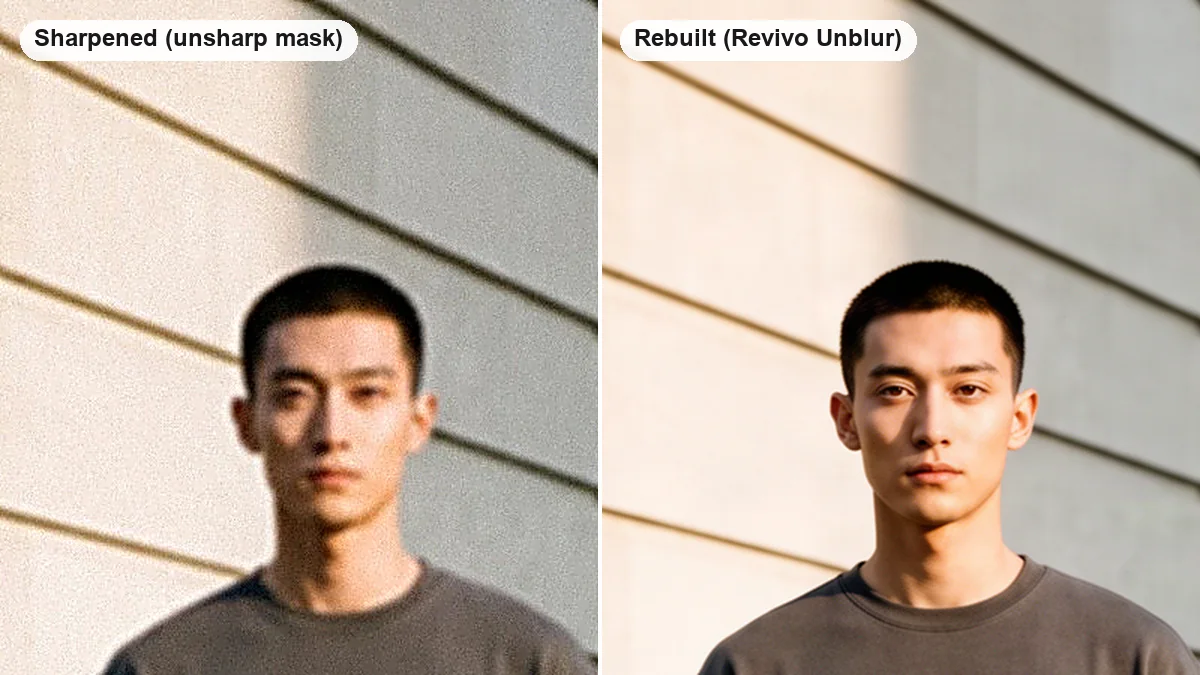
Sharpening makes existing edges crisper without adding new detail. Rebuilding asks a model to infer detail that may not be in the scan. That is why a rebuilt face can look clear and still differ from the person you remember. Topaz documents its face feature as “generating a high-quality version and blending it with the current face,” and notes “a loss of detail” can occur (official documentation, checked 2026-11-16). We cover what each vendor says below. To tell which kind of blur you have, see how to unblur an image.
How we chose what to compare
We looked at five things, in this order:
- Does it look like the person? What the vendor says about faces, and whether it describes any check.
- Damage. Whether the tool repairs scratches and tears, or only sharpens and enlarges.
- Colour. Whether it colorizes, and whether it says colours are inferred.
- How you pay. Subscription, credits, one-time purchase, or free, and whether there is a watermark.
- Privacy. How long files are kept, and what the vendor writes about it.
We did not run the same photo through every tool. Competitor facts come only from each vendor's own pages. That means this page says nothing about whose output looks better.
1. Revivo Photo: restoration with a face check
Revivo Photo is the tool we make, so this section is the longest and the most specific. Everything about prices and credits below is read from our own pricing configuration, and the pricing page shows the current numbers.
The five tools and what each costs
| Tool | What it does | Standard | HD |
|---|---|---|---|
| Restore | Rebuilds damaged parts of a photo; text regions from your original are pasted back | 2 credits | Not offered |
| Unblur | Rebuilds detail in blurry photos; Standard then compares faces with your original | 1 credit | 3 credits |
| Colorize | Adds colour to black-and-white photos | 1 credit | 2 credits |
| Unpixelate | Enlarges small or pixelated images | 1 credit | — |
| Sharpen | Sharpens edges inside your browser | 0 credits | Not offered |
Unpixelate costs 1 credit extra when the output is larger than 12 MP. Changing strength and re-downloading a result cost nothing more. Sharpen runs in your browser.
Faces: what we check and where it stops
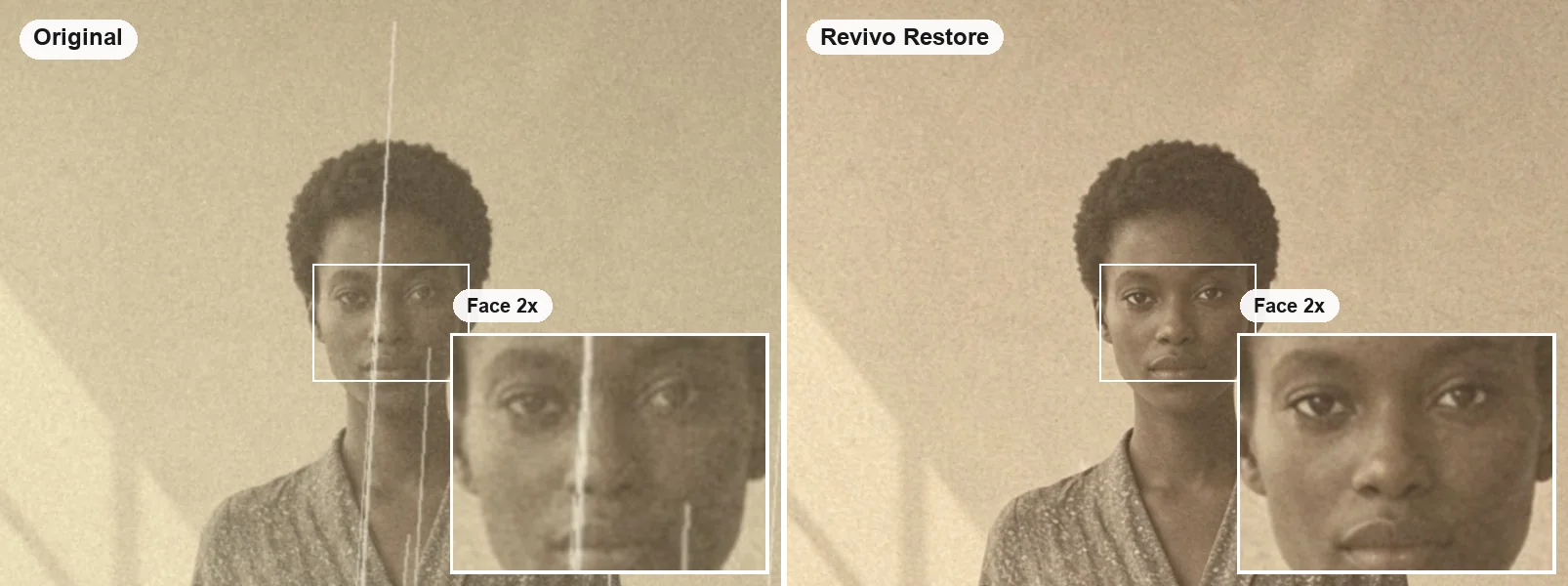
Our pricing page says generated results are checked for obvious face changes, but subtle differences can pass, and we ask you to compare a face with the original before downloading.
- Unblur Standard compares the faces in its result with the face in your original. This can catch an obvious face change. It can miss a subtle one. How the check works, and where it misses: AI restoration face test.
- Restore applies a separate face review. See the pricing page for its current credit terms.
- Colorize Standard keeps the brightness of your original and adds colour on top. It does not compare faces against the original.
- Unpixelate and Sharpen: we make no face-protection claim for them.
Handwriting and text
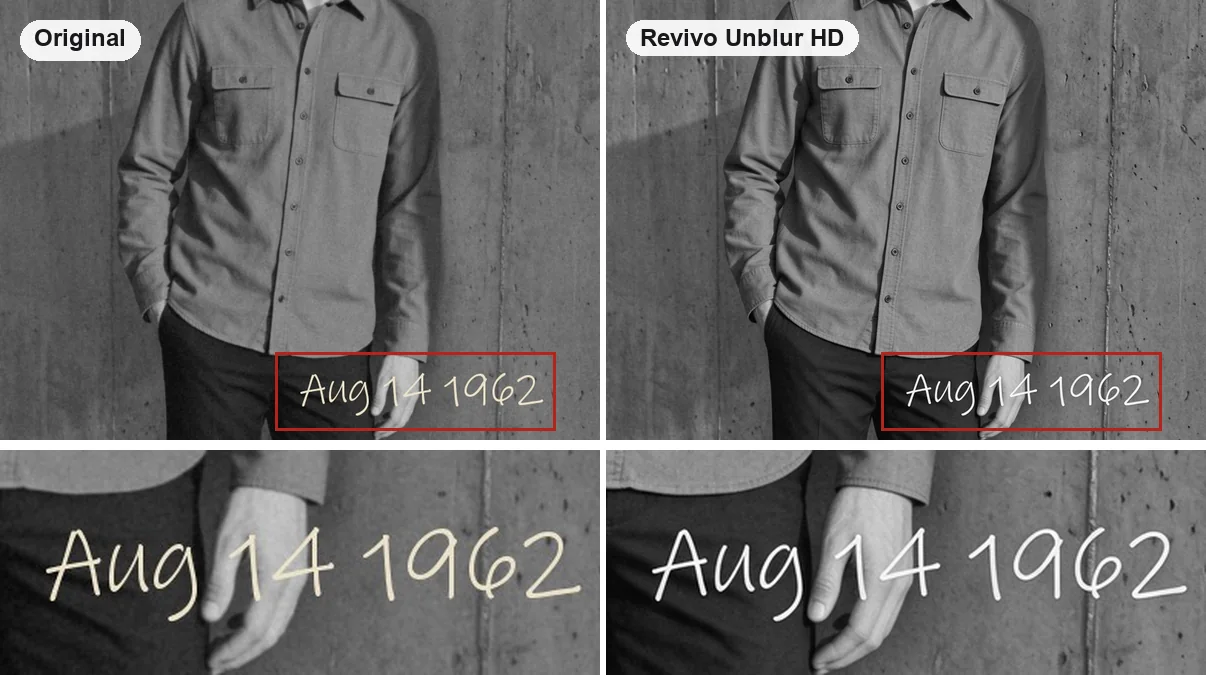
Restore pastes text regions from your original back onto the result. Zoom in on dates and names before you keep a copy.
What is free
- 1 free photo a day, without an account. A guest sees a smaller preview and signs in to download.
- Results have no watermark.
- Free downloads are capped at 2,000 px. Full-size downloads need Starter or above.
- 3 free credits when you sign up, for Standard only. HD needs paid credits.
Prices and credit packs
Credit packs do not expire; subscriptions are optional. You can buy only a pack and not subscribe. Subscription credits are issued monthly and expire when that month's credit period ends. Pack credits do not expire. If you hold both, credits closest to expiring are used first, so subscription credits are spent before pack credits.
| Credit pack | Credits | Price |
|---|---|---|
| Small | 10 | $4.99 |
| Album | 150 | $38.00 |
| Shoebox | 500 | $79.00 |
| Archive | 1,300 | $199.00 |
| Monthly plan | Credits per month | Monthly price | Yearly price |
|---|---|---|---|
| Starter | 40 | $9.90 | $95.00 |
| Pro | 200 | $29.90 | $250.00 |
| Archive | 500 | $49.90 | $299.00 |
Unblur and Colorize Standard cost 1 credit a photo, and Restore costs 2 credits. The price is shown before you start each photo. See current prices.
Photos that suit it, and photos that do not
It suits:
- Faded, blurry or low-resolution family photos you want to look at again.
- Black-and-white portraits you want in colour, when you accept that colours are chosen by the model.
- A few photos at a time, without a subscription.
It does not suit:
- Photos where every facial detail must match exactly. Rebuilt detail is inferred, and subtle differences can pass our check.
- Anything you need as a record of the original colours, because Colorize adds colour the original does not contain.
Privacy and retention
Originals and results are kept for 30 days, including for guests and free accounts. Sharpen runs in your browser.
| Revivo tool | Standard | HD |
|---|---|---|
| Restore | 2 | — |
| Unblur | 1 | 3 |
| Colorize | 1 | 2 |
| Unpixelate | 1 | — |
| Sharpen | 0 | — |
2. Remini: A mobile-first subscription app
iPhone, iPad, iMessage and Apple Vision; a web version exists.
- Position
- A mobile-first subscription app.
- Price
- The US App Store lists 1 Month at $9.99 and weekly plans from $4.99, though listed tiers are inconsistent. Web pricing: Not stated on official site (checked 2026-11-16).
- Free access
- Free download with in-app purchases. Allowance and watermark: Not stated on official site (checked 2026-11-16).
- Suited to
- iPhone users who want a one-tap app.
Official sources: App Store listing · checked 2026-11-16 · Privacy policy · checked 2026-11-16
3. MyHeritage: A bundled family-history service
Web; Reimagine is a mobile app.
- Position
- A bundled family-history service.
- Price
- Photo tool prices: Not stated on official site (checked 2026-11-16).
- Free access
- Photo Enhancer needs a free sign-up.
- Suited to
- People already using MyHeritage for family history.
Official sources: Photo Enhancer help · checked 2026-11-16 · Photo subscription help · checked 2026-11-16
4. Palette.fm: A colour-only tool with a one-time option
Web and API. Apps: Not stated on official site (checked 2026-11-16).
- Position
- A colour-only tool with a one-time option.
- Price
- The official homepage summary reported a one-time $49 for 75 credits and $72 a year for 480 credits; neither figure was manually verified on-page. Treat them as provisional.
- Free access
- 500×500 previews with a logo and no stated limit, plus one full-size trial credit.
- Suited to
- A few photos where you only want colour.
Official sources: Official homepage · checked 2026-11-16 · Partner page · checked 2026-11-16
5. Let's Enhance: A credit-based subscription with rollover
Web. Apps: Not stated on official site (checked 2026-11-16).
- Position
- A credit-based subscription with rollover.
- Price
- Starter 100 credits $12 a month ($9 billed yearly); Pro 300 credits $32 ($24); Max 500 credits $45 ($34). One image uses one credit.
- Free access
- 10 credits at sign-up; free output carries a watermark.
- Suited to
- People who want a credit plan with rollover while subscribed.
Official sources: Pricing · checked 2026-11-16 · Face enhancer · checked 2026-11-16
6. Topaz Photo: An installed app you subscribe to
Windows and macOS.
- Position
- An installed app you subscribe to.
- Price
- $39 a month, or $199 a year ($25 a month billed yearly). Subscription only.
- Free access
- Trial and watermark: Not stated on official site (checked 2026-11-16).
- Suited to
- People who want software on their own computer.
Official sources: Pricing · checked 2026-11-16 · Recover Faces documentation · checked 2026-11-16
7. VanceAI: A credit-based yearly subscription
Web and Windows.
- Position
- A credit-based yearly subscription.
- Price
- Starter 260 credits $15 a month, billed annually ($180); Popular 650, $360 a year; Creator 1,300, $540; Studio 2,600, $900. AI Photo Restorer: 4 credits at 1K/2K, 10 at 4K.
- Free access
- 10 credits to try; paid plans download without watermarks. Free-tier watermark: Not stated on official site (checked 2026-11-16).
- Suited to
- People who want a yearly credit plan.
Official sources: Pricing · checked 2026-11-16 · Image deletion help · checked 2026-11-16
8. PicWish: An online editor with several tools
Web, iOS, Android, Windows and Mac.
- Position
- An online editor with several tools.
- Price
- Not stated on official site (checked 2026-11-16). Its pricing page lists plans and a one-time credit pack but no dollar amounts.
- Free access
- Limited; watermark rules: Not stated on official site (checked 2026-11-16).
- Suited to
- People who want one editor for many tasks.
Official sources: Pricing · checked 2026-11-16 · FAQ · checked 2026-11-16
9. Photomyne: A phone scanning app with AI credits sold separately
iOS and Android. Its homepage says: “Touch-up old photos so they look as good - or better - than when the shutter snapped.”
- Position
- A phone scanning app with AI credits sold separately.
- Price
- Membership $19.99 a month, $59.99 a year or $119.99 for 3 years. AI features need AI credits bought separately: 20 for $3.99, 100 for $5.99, 500 for $14.99, 1,000 for $19.99, or unlimited for $35.99. Credits one AI Restore uses: Not stated on official site (checked 2026-11-17).
- Free access
- The annual plan has a 3-day free trial; the free tier is shown with ads. Watermark: Not stated on official site (checked 2026-11-17).
- Suited to
- People who want to scan prints with a phone first and restore second.
Official sources: Pricing · checked 2026-11-17 · AI credits FAQ · checked 2026-11-17
Price comparison
Yearly price per photo
Everything here is per photo, on yearly billing. Revivo's Unblur and Colorize Standard use 1 credit a photo and Restore uses 2 credits, so we show both. Let's Enhance says one image uses one credit. VanceAI's AI Photo Restorer uses 4 credits a photo at 1K and 2K. Revivo's Archive yearly price is an early-bird price and may change.
| Plan, yearly billing | Price a year | Photos a year | Price a photo | How we got it |
|---|---|---|---|---|
| Revivo Archive, one-credit tools | $299.00 | 500 credits × 12 = 6,000 | $0.05 | $299.00 ÷ 6,000 |
| Revivo Pro, one-credit tools | $250.00 | 200 credits × 12 = 2,400 | $0.10 | $250.00 ÷ 2,400 |
| Revivo Archive, Restore (2 credits) | $299.00 | 6,000 ÷ 2 = 3,000 | $0.10 | $299.00 ÷ 3,000 |
| Revivo Starter, one-credit tools | $95.00 | 40 credits × 12 = 480 | $0.20 | $95.00 ÷ 480 |
| Revivo Pro, Restore (2 credits) | $250.00 | 2,400 ÷ 2 = 1,200 | $0.21 | $250.00 ÷ 1,200 |
| Let's Enhance Starter | $9 × 12 = $108 | 100 × 12 = 1,200 | $0.090 | $108 ÷ 1,200 |
| Let's Enhance Max | $34 × 12 = $408 | 500 × 12 = 6,000 | $0.068 | $408 ÷ 6,000 |
| Let's Enhance Pro | $24 × 12 = $288 | 300 × 12 = 3,600 | $0.080 | $288 ÷ 3,600 |
| VanceAI Studio, AI Photo Restorer at 4 credits | $900 | 2,600 × 12 ÷ 4 = 7,800 | $0.115 | $900 ÷ 7,800 |
| VanceAI Starter | $180 | 260 × 12 ÷ 4 = 780 | $0.231 | $180 ÷ 780 |
| VanceAI Popular | $360 | 650 × 12 ÷ 4 = 1,950 | $0.185 | $360 ÷ 1,950 |
| VanceAI Creator | $540 | 1,300 × 12 ÷ 4 = 3,900 | $0.138 | $540 ÷ 3,900 |
Photomyne is not in this table or the chart: its AI credits are sold separately and the official site does not say how many credits one AI Restore uses, so a price per photo cannot be worked out (checked 2026-11-17). Sources: letsenhance.io/pricing and vanceai.com/pricing, checked 2026-11-16. VanceAI's 4K restorer setting uses 10 credits a photo, which would make a Studio photo about $0.288. Other VanceAI tools may use different credit counts.
A year of 6,000 photos
| Plan and task | What you pay for 6,000 photos in a year | How we got it |
|---|---|---|
| Revivo Archive, one-credit tools | $299.00 | 500 credits × 12 = 6,000 one-credit photos (early-bird price) |
| Let's Enhance Max, one image per credit | $408 | $34 × 12; 500 credits × 12 = 6,000 images |
| VanceAI Studio | $900 | 6,000 × 4 = 24,000 credits; Studio gives 2,600 × 12 = 31,200 credits for $75 × 12 |
Restore uses 2 credits a photo, so the same Archive plan (early-bird price) covers 3,000 Restore photos a year.
What restoring 1 or 10 photos costs
Each cell gives the amount and how we got it. Palette.fm is colour only and is not a restoration tool. Revivo has two rows: one-credit tools (Unblur and Colorize Standard) and Restore at 2 credits.
| Tool | 1 photo | 10 photos |
|---|---|---|
| Revivo Photo, Unblur or Colorize Standard (1 credit) | $0. Guest preview; sign-in to download. | $4.99. One credit pack after available sign-up credits. |
| Revivo Photo, Restore (2 credits) | $0. Guest preview; sign-in to download. | $9.90. Starter monthly plan; credits reset monthly. |
| Remini | $9.99 for 1 Month, if one month covers it. Photo allowance per plan: Not stated on official site (checked 2026-11-16). Source: App Store listing | Same $9.99, same caveat |
| MyHeritage | Not stated on official site (checked 2026-11-16) | Not stated on official site (checked 2026-11-16) |
| Palette.fm (colour only) | $0 with the one free full-size trial credit. Source: palette.fm | $49 for 75 credits, assuming one credit per photo |
| Let's Enhance | $0 with the 10 sign-up credits (one image = one credit); output is watermarked | $0 with the same 10 sign-up credits (10 images, watermarked); after that, Starter is $12 for 100 credits |
| Topaz Photo | $39 for 1 month. Per-photo limit: Not stated on official site (checked 2026-11-16) | $39 for 1 month, same caveat |
| VanceAI | $0 with the 10 trial credits (4 credits a restored photo, so 2 photos) | $180 up front for Starter, which must be billed annually (260 credits; 10 × 4 = 40 credits) |
| PicWish | Not stated on official site (checked 2026-11-16) | Not stated on official site (checked 2026-11-16) |
| Photomyne | Not stated on official site (checked 2026-11-17) | Not stated on official site (checked 2026-11-17) |
What this means
Two places where our model is cheaper. For a few photos: 1 free photo a day with no account and no watermark, then credit packs from $4.99 that do not expire, with subscriptions optional. For a lot of photos: on yearly billing, Archive works out to about $0.05 a photo with one-credit tools, the lowest of the yearly per-photo figures printed above for one-credit tools (early-bird price), and Pro about $0.10. Restore costs 2 credits, so it is about $0.10 a photo on Archive (early-bird price). Subscription credits reset each month. Free downloads are capped at 2,000 px; full-size downloads need Starter or above.
| Tool | Position | Per-photo price | Free access |
|---|---|---|---|
| Revivo Photo | Photo restoration with face checks | $0.05 / photo | 1 free photo per day |
| Remini | A mobile-first subscription app. | The US App Store lists 1 Month at $9.99 and weekly plans from $4.99, though listed tiers are inconsistent. Web pricing: Not stated on official site (checked 2026-11-16). | Free download with in-app purchases. Allowance and watermark: Not stated on official site (checked 2026-11-16). |
| MyHeritage | A bundled family-history service. | Photo tool prices: Not stated on official site (checked 2026-11-16). | Photo Enhancer needs a free sign-up. |
| Palette.fm | A colour-only tool with a one-time option. | The official homepage summary reported a one-time $49 for 75 credits and $72 a year for 480 credits; neither figure was manually verified on-page. Treat them as provisional. | 500×500 previews with a logo and no stated limit, plus one full-size trial credit. |
| Let's Enhance | A credit-based subscription with rollover. | $0.07 / photo (Max, annual) | 10 credits at sign-up; free output carries a watermark. |
| Topaz Photo | An installed app you subscribe to. | $39 a month, or $199 a year ($25 a month billed yearly). Subscription only. | Trial and watermark: Not stated on official site (checked 2026-11-16). |
| VanceAI | A credit-based yearly subscription. | $0.12 / photo (Studio, annual) | 10 credits to try; paid plans download without watermarks. Free-tier watermark: Not stated on official site (checked 2026-11-16). |
| PicWish | An online editor with several tools. | Not stated on official site (checked 2026-11-16). Its pricing page lists plans and a one-time credit pack but no dollar amounts. | Limited; watermark rules: Not stated on official site (checked 2026-11-16). |
| Photomyne | A phone scanning app with AI credits sold separately. | Membership $19.99 a month, $59.99 a year or $119.99 for 3 years. AI features need AI credits bought separately: 20 for $3.99, 100 for $5.99, 500 for $14.99, 1,000 for $19.99, or unlimited for $35.99. Credits one AI Restore uses: Not stated on official site (checked 2026-11-17). | The annual plan has a 3-day free trial; the free tier is shown with ads. Watermark: Not stated on official site (checked 2026-11-17). |

Revivo Photo: tool rates
| Tool | Standard | HD |
|---|---|---|
| Restore | 2 | — |
| Unblur | 1 | 3 |
| Colorize | 1 | 2 |
| Unpixelate | 1 | — |
| Sharpen | 0 | — |
Compare the plans and credit packs available for your photos.
What each tool publishes: a disclosure scorecard
| Tool | Try | Price | Expiry | Face check | Refund | Retention | Total |
|---|---|---|---|---|---|---|---|
| Revivo Photo | 2 | 2 | 2 | 2 | 2 | 1 | 11/12 |
| VanceAI | 1 | 1 | 1 | 0 | 1 | 2 | 6/12 |
| Let's Enhance | 1 | 2 | 1 | 0 | 0 | 1 | 5/12 |
| Photomyne | 1 | 0 | 0 | 0 | 1 | 0 | 2/12 |
| Remini | 1 | 0 | 0 | 0 | 0 | 1 | 2/12 |
| MyHeritage | 1 | 0 | 0 | 0 | 0 | 0 | 1/12 |
| Palette.fm | 1 | 0 | 0 | 0 | 0 | 0 | 1/12 |
| PicWish | 1 | 0 | 0 | 0 | 0 | 0 | 1/12 |
| Topaz Photo | 0 | 0 | 0 | 0 | 0 | 0 | 0/12 |
We chose these six dimensions, and they reflect what we care about, including several things Revivo does. This is a disclosure and price rubric, not an image-quality score. A fair image-quality comparison would require a blind test of the same input on every tool; this page has not done that. Separately, does AI photo restoration change faces reports a Revivo-only test.
Which tool fits your photos?
- A handful of photos, no subscription: Revivo Photo, with credit packs from $4.99 that do not expire, or Palette.fm if you only want colour.
- A lot of photos a year: Revivo Archive on yearly billing (early-bird price); see the yearly price per photo above.
- You already use MyHeritage: its photo tools are part of the subscriptions you may have.
- You prefer software on your own computer: Topaz Photo. Its Recover Faces docs say version 3 processes locally on NVIDIA, AMD and Apple Silicon (docs.topazlabs.com).
- An iPhone and one tap: Remini.
- Photo repair as one task among many edits: PicWish.
- Phone scanning of prints first, restoration second: Photomyne.
How we checked this comparison
Revivo Photo made this comparison, and we are one of the tools in it. We checked the official pages of the other eight tools on 2026-11-16 and Photomyne's on 2026-11-17, and we checked our own live pages and settings the same day. We did not run the same photo through every tool, so this page says nothing about whose results look better. Some figures were read from page summaries, and a few items could not be opened, which we marked "Not stated on official site". Prices change, so check the vendor's page before you buy.
A blind image-quality test using the same source photo and settings across all nine tools could change a separate quality comparison; this table does not score image quality. A vendor's price or plan change could change the cost scores. A newly located official source for registration, credit expiry, face checks, refund terms or retention could change the related score. Last checked: the other eight tools 2026-11-16, Photomyne 2026-11-17.
Frequently asked questions
What is the best photo restoration software for family photos?
It depends on the job. For a few photos without a subscription, Revivo Photo offers 1 free photo a day and credit packs. For colour only, Palette.fm. For a family-tree account, MyHeritage, which says its enhancement is a simulation whose results may be inaccurate. For software on your own computer, Topaz Photo. For many photos on yearly billing, see the yearly price per photo above. We make Revivo, so check the tables and each vendor's own page.
How can I restore an old photo without changing the face?
A tool that rebuilds detail can change a face. MyHeritage says its enhancement is a simulation and its results may be inaccurate (official help page, checked 2026-11-16). Let's Enhance says its models “reconstruct facial details” and that some details “may not be fully recoverable” in extreme blur (official face enhancer page, checked 2026-11-16). Topaz says Recover Faces generates and blends a face version, and notes it can lose detail (official documentation, checked 2026-11-16). Look for a tool that explains what it checks, and compare the result with your original. At Revivo, Unblur compares result faces with the original; subtle differences can pass.
Is there a free way to restore an old photo online?
Yes, with limits. Revivo gives 1 free photo with no account, no watermark, up to 2,000 px. Let's Enhance gives 10 credits at sign-up with a watermark. Palette.fm gives free 500×500 previews with a logo and one full-size trial credit. VanceAI gives 10 credits to try.
Do I need a subscription, and do unused credits expire?
Not for a few photos. Revivo sells credit packs that do not expire, and subscriptions are optional. Palette.fm sells a one-time $49 pack for colour. Topaz Photo is subscription only, and Let's Enhance and VanceAI list subscription plans. On credits: Revivo pack credits do not expire. Revivo subscription credits are issued monthly and expire when that month's credit period ends, and credits closest to expiring are used first. Let's Enhance rolls unused credits over while you stay subscribed. VanceAI says unused credits roll over, and expire when the subscription ends.
How much does it cost to restore hundreds of old photos?
Use the yearly price per photo in the table above, which lists every plan with its working. On yearly billing, Revivo Archive is about $0.05 a photo with one-credit tools and about $0.10 with Restore (early-bird price).
Are my family photos kept, and for how long?
It differs. Revivo keeps originals and results for 30 days. VanceAI says uploads are deleted within 24 hours of uploading or processing. Let's Enhance keeps data while the account is open and for no more than 12 months after it closes. Remini's policy gives three different retention times.
Where does Revivo Photo fit among these tools?
Revivo suits a few photos at a time, without a subscription, and when you want faces checked against the original. Try it on one photo.